Saturday, February 13, 2021

Accelerate Your Conversion to Modernizations with X-ADA ConVerge

 I recently published my first article on LinkedIn, regarding the conversion tool, ConVerge, by X-ADA. ConVerge has some very powerful features and can Accelerate the Conversion to Modernization.  Check out my Article below:

https://www.linkedin.com/pulse/accelerate-your-conversion-modernization-x-ada-converge-kevin-weaver


Or better yet, Check out X-ADA's WebSite:


https://www.x-ada.com


Wednesday, October 12, 2016

SQL to Identify When Job Data Field was Changed

Often in PeopleSoft we are trying to determine when an event became effective.  This SQL below is to identify when an employee's Company changed, but could be easily modified to identify when a department, position, supervisor or any job data element changed from the previous row.


SELECT NEW.EMPLID
, NEW.EFFDT
, NEW.COMPANY
, OLD.COMPANY
, OLD.HR_STATUS 
FROM PS_JOB NEW, PS_JOB OLD 
WHERE NEW.EMPLID = OLD.EMPLID 
AND NEW.EMPL_RCD = OLD.EMPL_RCD
AND NEW.COMPANY <> OLD.COMPANY 
AND OLD.EFFDT = (SELECT MAX(O_ED.EFFDT) 
                 FROM PS_JOB O_ED 
                 WHERE O_ED.EMPLID = OLD.EMPLID 
                 AND O_ED.EMPL_RCD = OLD.EMPL_RCD
                 AND O_ED.EFFDT <= (NEW.EFFDT -1))
Please note that this SQL does not use effective sequence, The reason for this is that I am not concerned with what sequence the company changed, I am only concerned about identifying the date.

Thursday, September 15, 2016

Using jQuery to control Save of Related Content


Related Content allows you to add functionality as well enrich a transaction with supporting information.  In this example I will be demonstrating saving the related content transaction from the target, in the video above the target transaction is the Performance document for Brian Drennon and the related content is the quarterly comments.

TargetContent JavaScript:

<script type="text/javascript" src="https://ajax.googleapis.com/ajax/libs/jquery/1.11.2/jquery.min.js"></script> 
<script type="text/javascript"> 
 
function save_rlcArea()
 {
   try {
window.top.document.getElementById('RelatedContent').contentWindow.document.getElementById('RCArea').contentWindow.remoteSave();}
catch (e) {
        // do nothing
  }
}
   
$( document ).ready(function() {
     
$("input[name='EXIT_SAVE#SAVE']").click(save_rlcArea());

});
</script>

This JavaScript injects jQuery into the TargetContent and creates a function called save_rlcArea.  This function attempts to call a function that is declared in the Related Content frame called remoteSave().  I use a try and catch because we are not sure if the user has even attempted to open the related content, so the frame may not even exists.

Related Content JavaScript:

<script type="text/javascript" src="https://ajax.googleapis.com/ajax/libs/jquery/1.11.2/jquery.min.js"></script>
<script type="text/javascript">
function remoteSave() {

  submitAction_%formname(document.%formname, '#ICSave');

};
</script>
<script>
$( document ).ready(function() {

var tgtHead = window.top.document.getElementsByTagName('Head');

var scriptJQ = document.createElement('script');
scriptJQ.type='text/javascript';
scriptJQ.src = "https://ajax.googleapis.com/ajax/libs/jquery/1.11.2/jquery.min.js";
tgtHead[0].appendChild(scriptJQ);
scriptJQ.onload = function () {

     window.top.$("a[role='tab']").click(function() {
     try {
           window.top.document.getElementById('RelatedContent').contentWindow.document.getElementById('RCArea').contentWindow.remoteSave();}

catch (e) {

             // do nothing
         }
});
};

//inserting button if the button is not there

var tgtFrame = window.top.document.getElementById('ptifrmtgtframe');
if ( !(tgtFrame.contentWindow.$( "input[name='EXIT_SAVE\\#SAVE']" ).length )) {

var $mySep = $("<span>" , {id: "Sep", class: "PSTEXT", style: "margin-left:2px;margin-right:0px"});
var $myAnchor = $("<a>", {id: "Left", class: "PSPUSHBUTTON", role : "presentation"});
var $myAnchorSpan = $("<span>");
var $myAnchorSpanInput = $("<input>", {type: "button",name: "EXIT_SAVE#SAVE", class: "PSPUSHBUTTON", style: "min-width:62px;", value: "Save", onclick: "javascript:save_rlcArea()"});


$myAnchorSpan.append($myAnchorSpanInput);
$myAnchor.append($myAnchorSpan);


tgtFrame.contentWindow.$("#EXIT_SAVE").append($mySep);
tgtFrame.contentWindow.$("#EXIT_SAVE").append($myAnchor);
}
//end insert of button code
});
</script>


If we take a closer look at this JavaScript it is doing that majority of the work. It creates the remoteSave() function used by the target content JavaScript.  Then it loads jQuery into the top window and then adds a handler to the related content tabs, this handler saves the contents of the related area if the user uses the tabs to navigate to another related content. And finally it evaluates if the target content has the save button, if it does not have the save button then it creates the save button that will call the remoteSave() function if it is clicked.


Please note, this code is not production ready.  This is simply an example of how you can improve the users experience.  Remove references to external files if you want to use this example in production.

Wednesday, September 14, 2016

Embedded Popup Help for Column Heading in Grid

Recently I was asked how to add popup help to a column header in a grid.  My approach was to use the Embedded Popup Help that you can configure on the grid properties.


This embedded popup help will add an image to the grid header, for most people this should be enough help to assist the user on what actions to perform.

However, if your super users insist on having this help on the label for the specific column then just use jQuery to move the help icon.

var myId = "hlpimg"+ %formname.name + "divZZ_RECRUITERS\\$0";
require(['jquery'], function ($) {
        $(document).ready(function() {
          $("#"+myId)
    .prependTo("#ZZ_RECRUITERS\\$0\\#1\\#");
          });
      });
Above I am using jQuery to move the popup help element to be between the label and the table data that allows you to resize the column header.

Here is the end results:


Thursday, September 1, 2016

Finding Changed PeopleCode

When promoting a project to our Test or QA environment from development, often we are missing changes that we intended to put into our PeopleSoft Project definition.  Whenever I have a project that takes me multiple weeks to complete I like to run this SQL to evaluate what PeopleCode events have been changed that don't exist in my project.

Bind :1 = OPRID that made the code changes.
Bind :2 = Project Name that is being promoted.

SELECT * FROMPSPCMPROG A 
WHERE LASTUPDOPRID = ':1' AND LASTUPDDTTM > (sysdate - 19)
AND NOT EXISTS ( SELECT 'X' FROM PSPROJECTITEM X WHERE X.PROJECTNAME = ':2'
                  AND X.OBJECTID1 = A.OBJECTID1
                  AND X.OBJECTVALUE1 = A.OBJECTVALUE1
                  AND X.OBJECTID2 = A.OBJECTID2
                  AND X.OBJECTVALUE2 = A.OBJECTVALUE2
                  AND X.OBJECTID3 = A.OBJECTID3
                  AND X.OBJECTVALUE3 = A.OBJECTVALUE3
                  AND X.OBJECTID4 = A.OBJECTID4
                  AND X.OBJECTVALUE4 = A.OBJECTVALUE4); 

Friday, August 26, 2016

Conditional Required Fields (SetCursorPos + ^)

When I need to conditionally set a field as Required I paste this code into my SaveEdit of the field I need to direct the user's attention.


 ^.Style = "";
If ZZ_REQUISITIONS.PER_ORG.Value = "CWR" And
      None(^.Value) Then
   SetCursorPos(%Page, ^, CurrentRowNumber());
   ^.Style = "PSERROR";
   Error MsgGet(14907, 1006, "Required Field", ^.GetLongLabel());
End-If;


This works just as well:


 &this = GetField();
&this.Style = "";
If ZZ_REQUISITIONS.PER_ORG.Value = "CWR" And
      None(&this.Value) Then
   SetCursorPos(%Page, ^, CurrentRowNumber());
   &this.Style = "PSERROR";
   Error MsgGet(14907, 1006, "Required Field", &this.GetLongLabel());
End-If;


The "^" will be replaced with the current Record.FieldName and Message 14907, 1006 is
"%1 is a Required Field".  In this example the Job Requisition is for a Contingent Worker, your optional condition will depend on your requirements.


Thursday, June 23, 2016

Handy CI Method for Job Data CIs

Here is a handy CI Method for the Job Data component that will set the Effective Sequence for a newly entered Job Data row.

CI Method code:

 Function setEffSeq
 
  Local Rowset &job;

   &job = GetRowset(Scroll.JOB);

  If &job(1).JOB.EFFDT.Value = &job(2).JOB.EFFDT.Value Then

      &job(1).JOB.EFFSEQ.Value = &job(2).JOB.EFFSEQ.Value + 1;

     End-If;

End-Function;


Screen Shot of Method in CI


This method is used after adding a new job row via the CI and then call this method to set the next effective sequence number.


Sample CI Code:

    &oSession = %Session;
    &oSession.PSMessagesMode = 1;
    &oZzCiJobData = &oSession.GetCompIntfc(CompIntfc.ZZ_CI_JOB_DATA);


 &oZzCiJobData.InteractiveMode = False;

 &oZzCiJobData.GetHistoryItems = True;

 &oZzCiJobData.EditHistoryItems = False;


 &oZzCiJobData.GET_EMPLID = [*];

 &oZzCiJobData.GET_EMPL_RCD = [*];


 rem ***** Execute Get *****;

 If Not &oZzCiJobData.Get() Then

  rem ***** No rows exist for the specified keys.*****;

  errorHandler();

  throw CreateException(0, 0, "Get failed");

 End-If;


    &oJobCollection  = &oZzCiJobData.JOB;


    &oJob = &oJobCollection.InsertItem(1); 


    &oJob.EFFDT = %DATE; 

    &oJob.action = "DTA"; 

    &oZzCiJobData.setEffSeq();

Even Better, use it in CI Template


A Better Way to Code with CIs

Security

Don't forget to Grant Security to your Method!

Thursday, June 16, 2016

Service Operations in PUM images

Whenever we used to apply Maintenance Packs in the past they typically would not touch Service Operations, but I am discovering now that PUM images are built of future tools releases and we are seeing our Service Operations, Handlers and routings be Inactivated as part of the PUM image.  A good way to compare them to production is to use SQL to identify what Service Operation are being used in Production and then use the output of the production SQL as input into your development environment to make sure you have activated all the service operation's and their handlers and routings in development and QA if applicable.


Service Operations


Run this SQL in Production:


select IB_OPERATIONNAME||VERSIONNAME
from PSOPRVERDFN where active_flag = 'A';

Use the output of this query in the environment impacted by your  PUM ## image:

select * from PSOPRVERDFN where active_flag = 'I' AND IB_OPERATIONNAME||VERSIONNAME IN ('GETFACETNODESV1'
,'COMPETENCY_FULLSYNC3VERSION_1'
,'DOORACLEFACETSEARCHV1'...**output from sql above***)


The rows returned will show you the Service Operations that were turned off by your PUM Image.


Handlers

Run this SQL in Production

SELECT IB_OPERATIONNAME||HANDLERNAME 
FROM PSOPRHDLR WHERE ACTIVE_FLAG = 'A';

Use the output of this query in the environment impacted by your  PUM ## image:

SELECT IB_OPERATIONNAME||HANDLERNAME FROM PSOPRHDLR 
WHERE IB_OPERATIONNAME||HANDLERNAME IN ('PTFP_GETFEEDREQUESTHDLR'
,'PTFP_GETFEEDLISTREQUESTHDLR'
,'PTFP_GETPREPUBFEEDREQUESTHDLR''...**output from sql above***)
 AND ACTIVE_FLAG = 'I';

The rows returned will show you the Handlers that were turned off by your PUM Image.

Routings

Run this SQL in Production

SELECT ROUTINGDEFNNAME 
FROM PSIBRTNGDEFN WHERE AND EFF_STATUS = 'A';

Use the output of this query in the environment impacted by your  PUM ## image:

SELECT *  FROM PSIBRTNGDEFN
WHERE ROUTINGDEFNNAME IN (
'~GENERATED~23086336'
,'~GENERATED~23110751'
,'~GENERATED~23132114'...**output from sql above***)
 AND EFF_STATUS = 'I';

The rows returned will show you the Routings that were turned off by your PUM Image.

This post is not intended to replace compare reports, but this SQL can used to spot check your work.  

Wednesday, May 4, 2016

PeopleSoft Query Related Content Service

Just the other night I was speaking to another PeopleSoft developer about embedding a PeopleSoft Query into a transaction and displaying the results in modal window.  My first thought was that you should be able to do this with minimal code, but I thought it would make a good blog posting.  So I started researching options to make this happen and was able to accomplish it without any code.

For my example I am going to use a security example where you want to execute a query that has both the Operator Id and the Operator Description in a query. I know that the system is delivered with a query that gives you the id(s), but not the description and often I want that piece of information.

So first I created a query:


Second create the Related Content Service:

Third associate the Service with your Content Reference:


Test:


Friday, March 4, 2016

Filtering Related Actions in the Company Directory

With 9.2 Oracle delivers over 500 related actions in the company directory.  The problem with these related actions is they point to both MSS and ESS transactions and there are no filters that prevent these from showing up on associates within the directory.  For example, this is what the related actions looks like for myself when I look up at my manager's related actions  Why would I be able to see View Compensation History for her?  Note, that there are two View Compensation History links.  One takes you to ESS and to MSS.


We need to filter out these services.  So I created a simple filter that looks like this for ESS:

 method linkVisible
   /+ Returns Boolean +/
   /+ Extends/implements PT_RCF:ServiceFilter.linkVisible +/
   Local string &emplid;
   
   try
      &emplid = HR_OC_NODE_WRK.EMPLID;
      
   catch Exception &trash
      &emplid = DERIVED_HRCD_MN.EMPLID;
   end-try;
   
   If &emplid = %EmployeeId Then
      Return True;
   Else
      Return False;
   End-If;
end-method; 


I created another one for MSS checks to see if the current user is a manager for the target emplid.

Then I used SQL to update the backend table and moved it to QA:


UPDATE  PSPTCSSRVCONF A SET PACKAGEROOT = 'ZZ_RLC_SERVICEFILTERS', QUALIFYPATH = ':',
APPCLASSID = 'isMeMss' where portal_objname = 'HC_HRCD_CO_DIRECTORY_GBL' AND PNLNAME = 'HRCD_MAIN'
AND exists ( select 'x' from PSPTCSSRVDEFN x where x.PTCS_SERVICEID = a.PTCS_SERVICEID 
AND X.PORTAL_MENUNAME IN (  'ROLE_MANAGER' ));
 
UPDATE  PSPTCSSRVCONF A SET PACKAGEROOT = 'ZZ_RLC_SERVICEFILTERS', QUALIFYPATH = ':',
APPCLASSID = 'isMeEss' where portal_objname = 'HC_HRCD_CO_DIRECTORY_GBL' 
AND PNLNAME = 'HRCD_MAIN'AND exists ( select 'x' from PSPTCSSRVDEFN x 
where x.PTCS_SERVICEID = a.PTCS_SERVICEID AND X.PORTAL_MENUNAME IN (  'ROLE_EMPLOYEE' ));

Now that looks correct.

Thursday, February 18, 2016

PeopleSoft Exit Interview

Been really busy lately supporting our newly upgraded HCM and Interaction Hub environments on top of trying to get all the ACA updates from Oracle.   All of this work has kept me from doing any blog post, however, the other day I was talking to my one of my clients and friends that works in our HR systems team and he was telling me about how we do exit interviews in Survey Monkey.  But the major issue with the survey was the lack of accurate demographic data that is collected by the Survey.

Right away I thought that we might be able to use Related Actions to link the demographic data from PeopleSoft to feed the Survey Monkey Exit Interview.  My first step was to look into Survey Monkey and see if I could pass the data in a query string, and their documentation pointed to Custom Variables.


The use of Custom variable allows you to pass data to the survey and this would eliminate the interviewer from having to collect this information.  I would only need to figure out how to tie the survey to the employee.  The logical choice was to use related actions to tie the survey to an employee.  So I created the following related content service and tied it to the Job Data Component using the emplid key to pass to my service.

As you can see I used an iScript to collect the data and redirect the request to the Survey Monkey URL.


   rem other code not shown selected most data from ps_employees;
   &queryString = "?EMPLID=" | &emplid;
   &queryString = &queryString | "&FIRST_NAME=" | &fname;
   &queryString = &queryString | "&LAST_NAME=" | &lname;
   &queryString = &queryString | "&FULLNAME=" | &utility.getUserNamebyEmplid(&emplid);
   &queryString = &queryString | "&GENDER=" | &gender;
   &queryString = &queryString | "&Ethnicity=" | ðnicDescr;
   &queryString = &queryString | "&VETERAN=" | &vetDescr;
   &queryString = &queryString | "&Manager=" | &utility.getUserNamebyEmplid(&mId);
   &queryString = &queryString | "&Region=" | ®ion;
   &queryString = &queryString | "&LOB=" | Substitute(&lobDescr, "&", "%26");
   &queryString = &queryString | "&Title=" | &title;
   &queryString = &queryString | "&JOBCODE=" | &jobcode;
   &queryString = &queryString | "&KEY_CORE=" | &KEY_CORE;
   &queryString = &queryString | "&LOBEC=" | &utility.getUserNamebyEmplid(&lobec);
   &queryString = &queryString | "&Regional=" | ®MgrName;
   &queryString = &queryString | "&Tenure=" | &tenure;
   &queryString = &queryString | "&Date=" | %Date;
   &queryString = &queryString | "&Interviewer=" | &utility.getUserNamebyOprid(%UserId);
   If %DbName = "HCMPRD" Then
      &url = GetURL(URL.ZZ_EXIT_INTERVIEW) | &queryString;
   Else
      &url = GetURL(URL.ZZ_EXIT_INTERVIEW_TEST) | &queryString;
   End-If;
   %Response.RedirectURL(&url);


Now when the Interviewer goes to Job Data they have a related Action to perform an exit interview.  This will open a new window with the exit interview in the targetcontent frame pre populated with the demographic data needed to analyze turnover.


Thursday, October 29, 2015

Tools Bug overlays Related Content Menu!

We recently upgraded from 9.1 tools 8.53 to 9.2 tools 8.54 and were the victim of an interesting issue with related content and workcenters.  When you have a workcenter componet that uses the Related Content configuration, the menu was being placed underneath a div that built by the workcenter and Oracle stated that this will not be fixed until tools 8.55.  See illustration below:


So what can you do in the mean time?

After much thought I decided to use Branding Objects to see if I could inject some JavaScript to move the Related Content menu down to the component Pagebar.  To accomplish this I had already implemented Jim Marion's RequireJS using Branding System Options.  Now I all had to do was write the JavaScript to move the menu from underneath the workcenter div to the pagebar and upload it to the system.  Below is my JavaScript:  


require(['jquery'], function ($) {   
$( document ).ready(function() {
var checkExist = setInterval(function() {
   if ($("a[name^='EOTL_SS_HDR_ACTION_RT#NOTIFY']").length) {
    
      clearInterval(checkExist);
      $('<span name="zzSEP2" id="SEP" class="PSTEXT" style="margin-left:8px;margin-right:8px">|</span>').insertAfter($("a[name^='EOTL_SS_HDR_ACTION_RT#NOTIFY']"));
$('#rcMenuOnTC').insertAfter($("span[name^='zzSEP2']"));     
   }
}, 100);
});
});

After testing the JavaScript using firebug, I used the Branding Components in tools 8.54+ to upload my JavaScript for use in the Component branding.  Component Branding can be located using
 Main Menu>>PeopleTools>>Portal>>Branding>>Component Branding, just select the component that you want to inject your JavaScript into and test.


Thursday, July 9, 2015

IMPROVING THE USER EXPERIENCE USING RELATED CONTENT

On June 24th, I had the distinct pleasure of being selected to present my UX presentation for the PeopleTools Tech SIG's Open Mic Call.  And when I say "selected",  I really mean I hounded a couple of the officers until the gave in and let me present it.  But nonetheless, I got the June time slot and if you missed it and have a quest membership you can watch the recorded webinar using the link below.

http://www.questdirect.org/content/view.do?contentId=2776328

Presentation Includes:

  1. The use of the RLC_QueryDataSource which allows the user to utilize Pagelet Wizard to present up to 25,000 rows of data in Related Content and presents links within the Pagelet Wizard content in a user friendly lightbox API (ColorBox)
  2. A demonstration on how to leverage the Query API to generate Query Spreadsheets directly to the user using Related Content.
  3. A demonstration on how to generate Spreadsheet reports from related content using David Vandiver's SQR2XLS IScript code in combination with Kevin’s ROWSET_TO_CELLS function to easily generate spreadsheets.
  4.  Discuss how UMB is using Related Content to generate Spreadsheets for use with the Excel to CI utility to manage Position Data.

Presentation will include:
  1. The use of the RLC_QueryDataSource which allows the user to utilize Pagelet Wizard to present up to 25,000 rows of data in Related Content and presents links within the Pagelet Wizard content in a user friendly lightbox API (ColorBox)
  2. A demonstration on how to leverage the Query API to generate Query Spreadsheets directly to the user using Related Content.
  3. A demonstration on how to generate Spreadsheet reports from related content using David Vandiver's SQR2XLS IScript code in combination with Kevin’s ROWSET_TO_CELLS function to easily generate spreadsheets.
  4. Discuss how UMB is using Related Content to generate Spreadsheets for use with the Excel to CI utility to manage Position Data.
- See more at: http://www.questdirect.org/content/view.do?contentId=2776328#sthash.ZrhJzEFJ.dpuf
Presentation will include:
  1. The use of the RLC_QueryDataSource which allows the user to utilize Pagelet Wizard to present up to 25,000 rows of data in Related Content and presents links within the Pagelet Wizard content in a user friendly lightbox API (ColorBox)
  2. A demonstration on how to leverage the Query API to generate Query Spreadsheets directly to the user using Related Content.
  3. A demonstration on how to generate Spreadsheet reports from related content using David Vandiver's SQR2XLS IScript code in combination with Kevin’s ROWSET_TO_CELLS function to easily generate spreadsheets.
  4. Discuss how UMB is using Related Content to generate Spreadsheets for use with the Excel to CI utility to manage Position Data.
- See more at: http://www.questdirect.org/content/view.do?contentId=2776328#sthash.ZrhJzEFJ.dpuf
Presentation will include:
  1. The use of the RLC_QueryDataSource which allows the user to utilize Pagelet Wizard to present up to 25,000 rows of data in Related Content and presents links within the Pagelet Wizard content in a user friendly lightbox API (ColorBox)
  2. A demonstration on how to leverage the Query API to generate Query Spreadsheets directly to the user using Related Content.
  3. A demonstration on how to generate Spreadsheet reports from related content using David Vandiver's SQR2XLS IScript code in combination with Kevin’s ROWSET_TO_CELLS function to easily generate spreadsheets.
  4. Discuss how UMB is using Related Content to generate Spreadsheets for use with the Excel to CI utility to manage Position Data.
- See more at: http://www.questdirect.org/content/view.do?contentId=2776328#sthash.ZrhJzEFJ.dpuf

Tuesday, June 30, 2015

Clean up Company Directory Trees

If you are utilizing the company directory then you are probably building a new company directory tree every morning for the current day's use.  Eventually you are going to need to delete these old trees or it will have a performance effect on your directory or your SES search index for person.  This is the code from the one step Application Engine that I wrote to delete those old trees that have served their purpose.  It finds the max effdt tree and then deletes any historical trees that were created three days before that date.  Please note, if you are building any future dated trees, you will need to modify this code to prevent you from deleting the current effective dated tree.

&Session = %Session;

&MYTREE = &Session.GetTree();

Local Rowset &TREE = CreateRowset(Record.PSTREEDEFN);

SQLExec("SELECT MAX(EFFDT) -3 FROM PSTREEDEFN WHERE TREE_NAME = 'COMPANY_DIRECTORY'", &Max);

&count = &TREE.Fill("Where FILL.effdt < :1 and FILL.TREE_NAME = 'COMPANY_DIRECTORY'", &Max);

For &X = 1 To &count
   If All(&MYTREE) Then
      &RETVALUE = &MYTREE.Delete("", "", "COMPANY_DIRECTORY", &TREE(&X).PSTREEDEFN.EFFDT.Value, "");
   End-If;
End-For;

Monday, June 15, 2015

Get the RLC_QueryDataSource and More

If you have been following my blog, then you know I have been showing ways your organization can improve the UX by using Related Content.  This post is dedicated to sharing that knowledge in the form of a downloadable project.  This project contains the source code for the RLC_QueryDataSource and also contains the source code for using the Query API to generate Excel documents in Related Content.  You will still need to setup your datasource and configure the related content in order to use these examples, but don't fret I show you how do that in the original posts.


RLC_QueryDataSouce
Query API in From Related Content

Monday, May 11, 2015

Using Query API to Generate XLS documents from Related Content

Recently I demonstrated how to generate Excel reports from IScripts and stream them directly to the user via Related Actions.  Today I am going to continue that theme by showing how you can utilize the Query API and its method FormatBinaryResultsString to run query results to Excel.   In the previous examples I use David Vandiver's SQR2XLS IScript code in combination with my ROWSET_TO_CELLS function to easily generate spreadsheets.  In this example I will show you how you can use the Query API to generate Excel documents from Query definitions and use Related Actions to associate these Queries to a PeopleSoft transactions.


First you will need to create a WEBLIB.  I used one that I have already created called, WEBLIB_ZZ_XLS.  Then add the ISCRIPT1 field and copy the following code to the FieldFormula.


Function IScript_ToExcel();
   
   Local string &QryName, &QryDescr, &PrivateFlag;
   Local ApiObject &QryObj;
   Local Rowset &rsURLList;
   Local Record &rRecordExpr;
   
   
   Local array of string &bindArray = CreateArray(%Request.GetParameter("BIND1"), %Request.GetParameter("BIND2"), %Request.GetParameter("BIND3"), %Request.GetParameter("BIND4"), %Request.GetParameter("BIND5"), %Request.GetParameter("BIND6"), %Request.GetParameter("BIND7"), %Request.GetParameter("BIND8"), %Request.GetParameter("BIND9"), %Request.GetParameter("BIND10"));
   &QryName = %Request.GetParameter("QRYNAME");
   
   &QryObj = %Session.GetQuery();
   &returnStatus = &QryObj.Open(&QryName, True, False);
   
   
   &promptRecord = &QryObj.promptrecord;


   If &promptRecord <> Null Then
      For &i = 1 To &bindArray.Len
         If All(&bindArray [&i]) Then
            Local string &thisBind = "BIND" | String(&i);
            
            SQLExec("SELECT FIELDNAME  FROM PSQRYBIND WHERE OPRID = ' ' AND QRYNAME = :1 AND BNDNAME=:2", &QryName, &thisBind, &fieldName);
            REM MAP BIND VARIABLES TO THE  QUERY prompts;
            &TEMPSTRING2 = "Field." | &fieldName;
            &Prompt = &promptRecord.getfield(@&TEMPSTRING2);
            Evaluate &Prompt.Type
            When "DATETIME"
               
               &Prompt.Value = DateTimeValue(&bindArray [&i]);
               Break;
            When "DATE"
               
               &Prompt.Value = DateValue(&bindArray [&i]);
               Break;
            When "TIME"
               
               &Prompt.Value = TimeValue(&bindArray [&i]);
               Break;
            When-Other
               
               &Prompt.Value = &bindArray [&i];
            End-Evaluate;
            
            &LinkParamList = &LinkParamList | "&" | EncodeURLForQueryString(&fieldName) | "=" | EncodeURLForQueryString(&bindArray [&i]);
         End-If;
      End-For;
   End-If;
   
   %Response.SetContentType("application/vnd.ms-excel;");
   
   &sTempString = "attachment; filename=" | &QryName | "_" | Int(Rand() * 10000) | ".xls";
   %Response.SetHeader("Content-Disposition", &sTempString);
   
   If %Response.CharSet = "UTF-8" Then
      %Response.Write("");
   End-If;
   %Response.Write("" | &QryName | "");
   
   %Response.Write("");
   
   
   &QryDescr = &QryObj.Description;
   If All(&QryDescr) Then
      %Response.Write("

" | &QryDescr | "

"); Else %Response.Write("

" | &QryName | "

"); End-If; %Response.Write("

" | &LinkParamList | "

"); &gQueryRowset = &QryObj.RunTorowset(&promptRecord, 25000); %Response.WriteBinary(&QryObj.FormatBinaryResultString(&gQueryRowset, %Query_XLS, 0, 0)); &QryObj = Null; &gQueryRowset = Null; Return; End-Function;
Make sure you set security to your new IScript and then create your Related Content Service:

I have added 10 Unique Prompt Names, feel free to add as many as you need!


For my example I have created a simple query called ZZ_EE_BY_JOBCODE, that selects Active Employee's in a Jobcode.  This is the SQL from the query tools:

SELECT A.EMPLID, A.EMPL_RCD, A.JOBCODE,  ':1', A.DEPTID
  FROM PS_JOB A, PS_EMPLMT_SRCH_QRY A1
  WHERE ( A.EMPLID = A1.EMPLID
    AND A.EMPL_RCD = A1.EMPL_RCD
    AND A1.OPRID = 'PS'
    AND ( A.EFFDT =
        (SELECT MAX(A_ED.EFFDT) FROM PS_JOB A_ED
        WHERE A.EMPLID = A_ED.EMPLID
          AND A.EMPL_RCD = A_ED.EMPL_RCD
          AND A_ED.EFFDT <= SYSDATE)
    AND A.EFFSEQ =
        (SELECT MAX(A_ES.EFFSEQ) FROM PS_JOB A_ES
        WHERE A.EMPLID = A_ES.EMPLID
          AND A.EMPL_RCD = A_ES.EMPL_RCD
          AND A.EFFDT = A_ES.EFFDT)
     AND A.JOBCODE = :2
     AND A.HR_STATUS = 'A' ) )

:1 is the Jobcode Description, rather than join the jobcode table to this query, I will pass the description in from the page.

The next step is to create your Related Action on the Jobcode Tbl.


Then configure your new Service to send over the Job Title from the page and use the Jobcode as the Bind :2 prompt.


And finally Test your New Service on the Jobcode:


 Now your business user can associate any PeopleSoft Query to any transactions,

Wednesday, April 29, 2015

HR_DIRECT_REPORTS:DirectReports

HR_DIRECT_REPORTS is an Application Package used throughout the HCM system to achieve Supervisor Data, Peer Data and Direct Report Data.  The package requires that you set either a Target Position or Target Emplid/Empl Rcd and Navigation Method.  

Navigation Methods:
      (1) "Department Security Tree"
          Returns a flat list of all employee/jobs that are accessible
          to the target employee, based upon the target employee's
          RowSecClass. Note that there is no concept of a reporting
          hierarchy when using this method.
          This method cannot be used to determine an employee/job's supervisor.
          It can only be used to generate a list of "direct reports".

      (2) "Supervisor Id"
          Uses the "Supervisor Id" field on the Job record to determine
          reporting relationships. Note that this method does not differentiate
          between multiple concurrent jobs that the supervisor might hold.

      (3) "Department Manager Id"
          The relationship between an employee/job and a supervisor is
          defined by the Department table. The "Manager Id" defined on
          the Department table for the employee/job's department id is
          considered to be the employee/job's supervisor.
          When determining the supervisor for an employee/job, if there
          is no Manager Id associated with the employee's department, then
          we walk up the Department Tree to get the next highest department
          in the department hierarchy that has a Manager Id assigned.
          Note that this method does not fully differentiate between
          multiple concurrent jobs that the supervisor might hold.

      (4) "Reports To"
          This method requires that Full Position Management be implemented.
          The relationship between an employee/job and a supervisor is
          defined by the "Reports To" position on the Job record.
          When determining the supervisor for an employee/job, if there is
          no incumbent in the "Reports To" position on Job, then we walk the
          Position_Data table to get the incumbent in the next highest position
          in the position hierarchy.

      (5) "Partial Position Management / Supervisor Id"
          This method is a combination of "Reports To" and "Department Manager Id".
          First, the "Reports To" method is executed, and then the "Department Manager Id"
          method is executed. The results of these two methods are combined, giving
          preference to the "Reports To" method.
          This method should be used only when Partial Position Management
          has been implemented.

      (6) "Partial Position Management / Department Manager Id"
          This method is a combination of "Reports To" and "Supervisor Id".
          First, the "Reports To" method is executed, and then the "Supervisor Id"
          method is executed. The results of these two methods are combined, giving
          preference to the "Reports To" method.
          This method should be used only when Partial Position Management
          has been implemented.

      (7) "Group Id"
          This method is similar to the "Department Security Tree" method in that
          a flat list of employee/jobs is presented. There is no sense of a hierarchy
          when using this method. The list of employee/jobs returned is simply a list
          of all group members.
          This method cannot be used to determine an employee/job's supervisor. It
          can only be used to generate a list of "direct reports"

Below is an example of method that utilizes the HR_DIRECT_REPORTS application package to find a person's manager and then it will use the manager's position number if the current manager is not active.  This is useful if you are trying to skip manager's who are on leave.  If the initial call does not return an active manager it will recursively call itself until it finds a manager who is active.
 
method getManager
   Local integer &x;
   Local Rowset &results;
   Local string &rsltPosition;
   %This.DirRpts = create HR_DIRECT_REPORTS:DirectReports();
   %This.DirRpts.AsOfDate = %This.JobRecord.EFFDT.Value;
   &rsltPosition = &position;
   If All(&rsltPosition) Then
      %This.DirRpts.TargetPosition = &position;
   Else
      %This.DirRpts.TargetEmplid = %This.JobRecord.EMPLID.Value;
      %This.DirRpts.TargetERN = %This.JobRecord.EMPL_RCD.Value;
   End-If;
   %This.DirRpts.UseDirectReportsTables = False;
   %This.DirRpts.ShowName = False;
   %This.DirRpts.NavigationMethod = 4;
   %This.DirRpts.GetSupervisor();
   &results = %This.DirRpts.Supervisor;
   For &x = 1 To &results.RowCount
      If &results(&x).GetRecord(1).EMPL_STATUS.Value = "A" Then
         %This.managerID = &results(&x).GetRecord(1).EMPLID.Value;
         &mgrFound = True;
      End-If;
   End-For;
   
   If Not &mgrFound Then
      &rsltPosition = &results(1).GetRecord(1).POSITION_NBR.Value;
      If All(&rsltPosition) Then
         &position = &rsltPosition;
         %This.getManager();
      End-If;
   End-If;
end-method;
 
 
If you want to play around with this API, you an use the following navigation Main Menu>>Set Up HRMS>>Common Definitions>>Direct Reports for Managers>>Invoke Direct Reports API  and play around with the API through an easy to use GUI.


Thursday, April 2, 2015

Create XLS Reports From Related Actions

If you want to get the most out of your 8.5x toolset you need to start leveraging the power of related content and actions.  One way to improve UX is to generate on demand reporting right from the transaction.

Related actions can be used to call IScripts and IScripts can be used to generate XLS reports and send them to directly to the user.  Below is an example of a report we generate for Succession Planning, this report exports all the plans within the current users organization and break them up by Line of Business, with each line of business on its own worksheet.


To Generate Speadsheets from Related Actions, start by down loading my example project that can be found here.  (Note, if you cannot get to this content, your firewall is blocking it).  After installing this project, at your own risk, into a development like PeopleSoft environment, then you need to configure your Related Content Service:


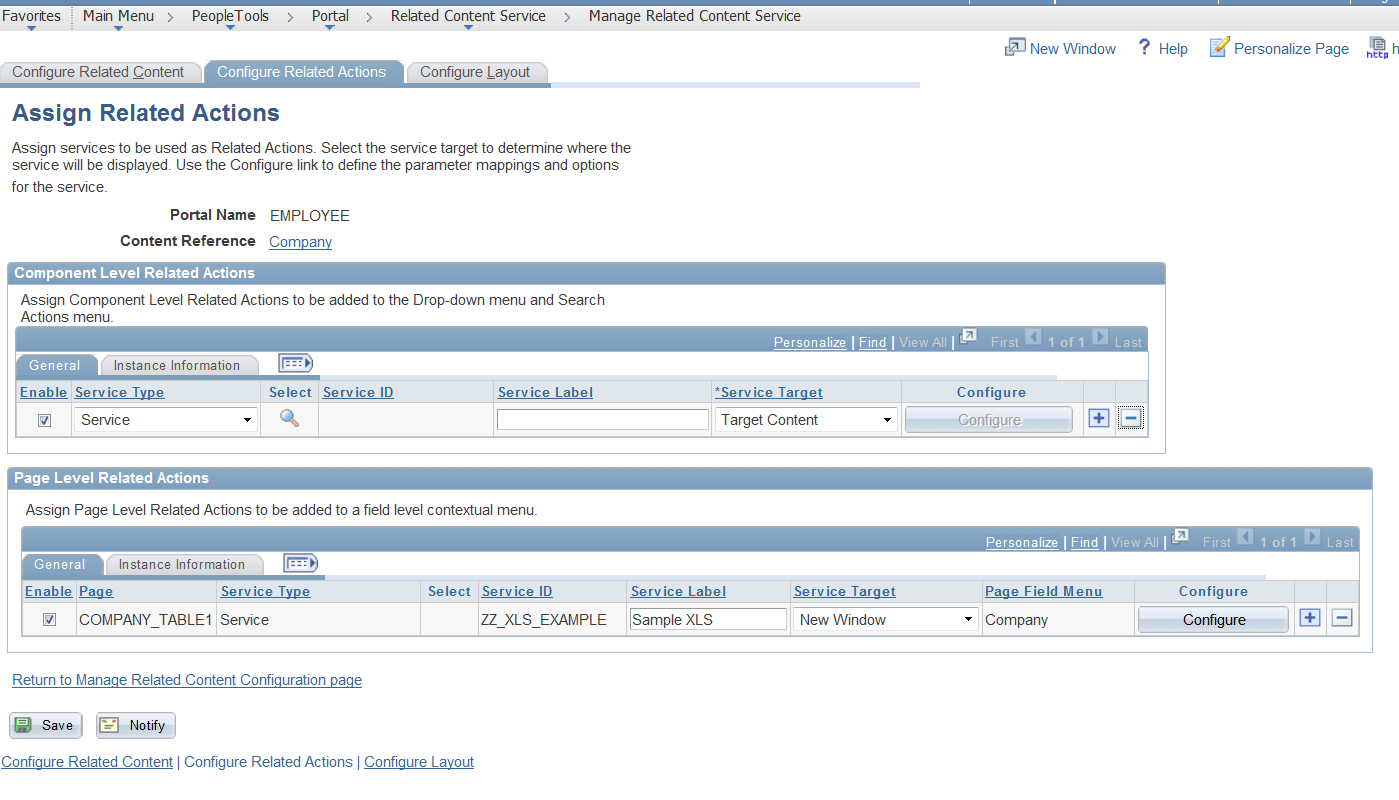
After you configured your Related Content Service you need to configure your new service to work on the Company Content Reference.   Make sure you also grant your test user access to your IScript, because it will not show up unless you have explicit security to the content, meaning PeopleSoft Admin role will not cut it.


Then Click into the Configure button above and Map the Menu option to the Company on Level 0 of the component, 

Now you are ready to view the end result.


Generate Excel Reports from IScripts

This is an example Project that demonstrates how you can generate Excel Reports from IScripts.  It is written for HCM, but could easily be adapted to FIN.  You will need to download the project from the link below:

https://app.box.com/s/wlhbppqxncayq7q60evj59l4gwp4vgqn

The IScript uses requires one Querystring parameter, COMPANY.  The company will be used to select all employees from the Employee's record and puts the results into an XML 2003 Spreadsheet and streams it via the browser.


Please note, downloading and installing this project is at your own risk.  With that said please compare the project with your target environment to make sure you are not accidently destroying one of your own custom objects.


Thursday, February 19, 2015

Succession 360 - Hiding HCSC Folder Tabs

We are implementing Succession Planning and I was asked to hide Some Tabs on the Succession 360 page that we were not going to utilize.  My first thought was I could navigate to the Configure Folder Tabs and simply delete the tabs that we are not using.  You can find the Configure Folder Tabs using the navigation below:

Set Up HRMS > Common Definitions > Folder Tabs > Configure Folder Tabs

Or use 

Main Menu>>Enterprise Components>>Find Object Navigation and search for Component Name HCSC_TAB_DEFN

When I deleted the Tabs the component stopped loading and gave me hard peoplecode errors, because the component has hard coded values for the number of tabs it is expecting.  So to make this happen I configured all the tabs that I wanted to delete and moved them to the end of the Tabset and used JavaScript to hide them in the component. I also renamed the Tab Set Id from Tab## to ZZHIDE for the tabs that I wanted to hide.


This simplified my JavaScript to one line.


<script language="JavaScript">

$(document).ready(function(){

$( "a[name$='ZZHIDE']" ).css( "visibility", "hidden" );

})

</script>